

Claude Just Moved Into Microsoft Word. Lawyers Should Pay Attention.
TL;DR: Anthropic launched Claude for Word as a beta add-in that lives inside your document, edits with track changes, reads comments, preserves formatting, and shares context across Word, Excel, and PowerPoint simultaneously. It’s built for document-heavy professionals, and Anthropic isn’t being subtle about who they mean: the first use case on the product page is legal contract review. I’ve been using it. It’s genuinely good. And it’s better than what Microsoft currently offers natively.
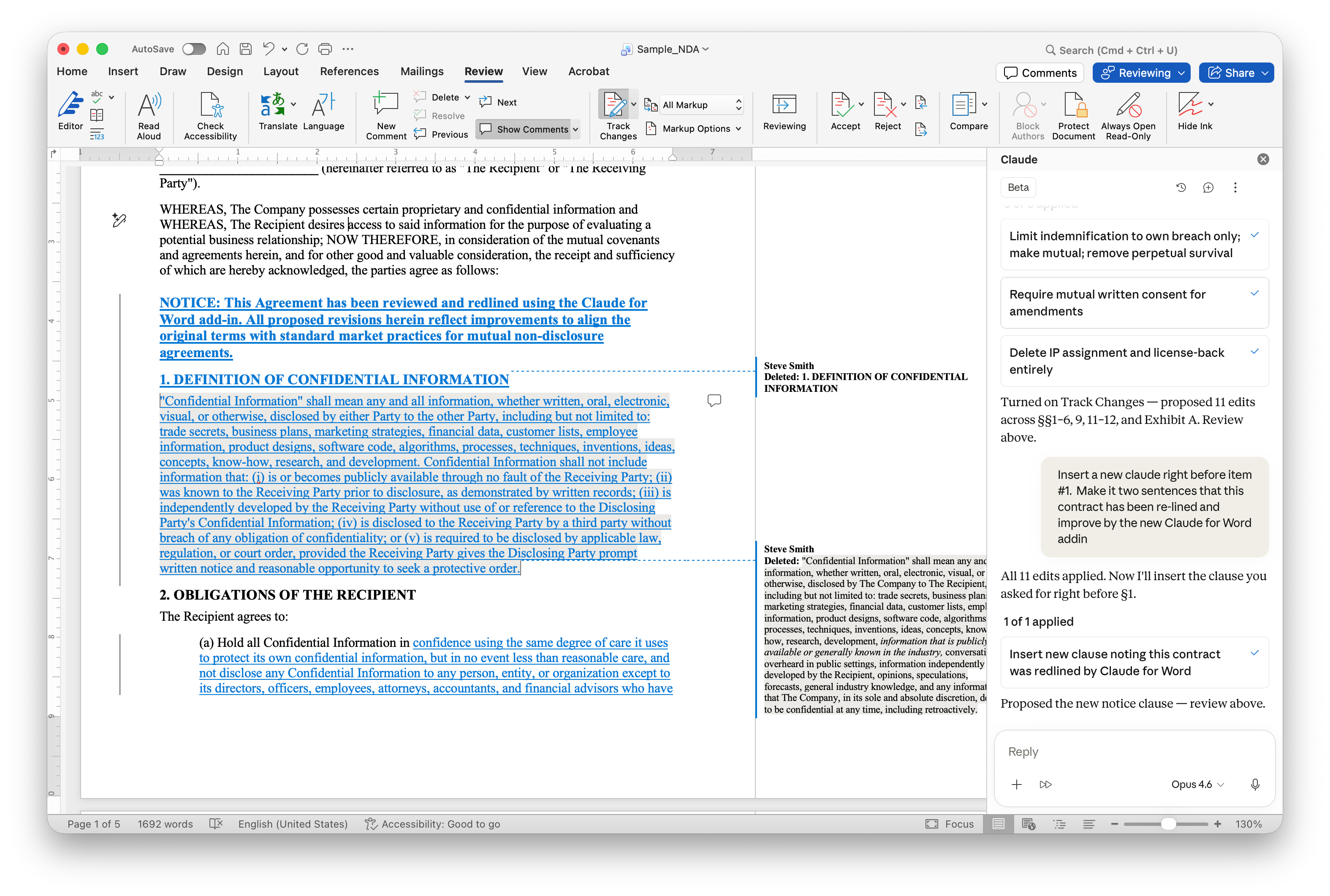
I installed it yesterday morning. By lunch, I’d used it to tear through a 30-page document, rewrite two sections, and respond to a string of comments. All without leaving Word. All with track changes on.
That last part matters more than anything else I’m about to tell you.
Why Track Changes Is the Whole Ballgame
If you work with lawyers, you already know this. Track changes isn’t a nice-to-have. It’s the operating system of legal document work. Every edit needs to be visible. Every revision needs to be reviewable. Every change needs an audit trail that a partner, client, or opposing counsel can walk through line by line.
Here’s what Claude for Word actually does: when you flip it into suggested edits mode, every change Claude makes shows up as a native Word tracked revision. Deletions in red. Insertions in green (unless you’re like me and have changed your colors!). You accept or reject each one in Word’s own review pane, the same way you’d handle markup from a junior associate or co-counsel.
Think about what that means. You can tell Claude to rewrite an indemnification clause, make it mutual, cap damages at 12 months of fees. And instead of getting a blob of text you have to copy-paste and manually compare, you get a clean redline you can review in 30 seconds.
I’ve been testing AI tools in legal workflows for over two years now. This is the first time the output arrives in a format that matches how lawyers actually work.
It Reads Your Document Like a Colleague Would
Most AI integrations treat your document like a pile of text to be summarized. Claude for Word does something different. It reads your heading styles, your numbering schemes, your defined terms, your cross-references. When it edits a section, the surrounding formatting stays intact. No blown-up numbering. No reformatted headers. No wrestling with styles after every AI touch.
This sounds like a small thing. It’s not. Anyone who’s ever had to rebuild a 50-page agreement’s numbering after a bad paste knows exactly what I’m talking about.
And then there’s comment-driven editing. Leave comments in your document where you want changes. Claude reads each comment thread, understands what text the comment is anchored to, edits that specific passage as a tracked change, and replies to the comment thread explaining what it did. For review workflows where a partner drops notes like “tighten this” or “make this mutual” or “I don’t like this language,” Claude can work through the entire stack.
Cross-Document Context Is a Quiet Superpower
Here’s a feature that hasn’t gotten enough attention yet. Claude for Word shares context with Claude for Excel and Claude for PowerPoint. In a single conversation, Claude can see what’s open across all three apps.
Think about what that means for deal work. You’ve got a financial model open in Excel, a presentation deck in PowerPoint, and a memo or agreement in Word. You can tell Claude to pull specific numbers from the model into the memo. Or to draft an executive summary in the deck based on the agreement’s key terms. No copy-paste. No re-explaining what’s in each file.
For firms doing M&A, private equity, or any transaction work that involves bouncing between financial data, slide decks, and legal documents, this is a significant time savings. And it’s genuinely hard to find this capability anywhere else right now.
It’s Better Than What Microsoft Offers. That’s Not Just My Opinion.
I want to be direct about this because I know some of you are already paying for Microsoft 365 Copilot and wondering whether you need another AI tool in Word.
Early indications suggest Claude handles long documents, complex reasoning, and careful editing well compared to Copilot’s current offering, though head-to-head reviews are still emerging. Claude’s context window lets it process entire contracts and lengthy reports in a single pass, something that trips up other tools. And the tracked changes implementation, where every edit lands as a reviewable revision, is cleaner and more reliable than what Copilot currently delivers.
In my testing, Claude for Word feels less like a tool bolted onto the application and more like it actually understands Word’s document model. The formatting preservation, the comment-thread awareness, the style inheritance when filling templates. These are details that matter enormously to professionals who live in Word all day.
It’s worth noting that Microsoft is now integrating Claude models into its own Copilot product. When a company like Microsoft builds your models into its platform alongside its own, that says something about where the technology stands.
What You Should Know Before Rolling This Out
A few practical realities to keep in mind.
Claude for Word is in beta. Anthropic is upfront about the limitations: don’t use it for final client deliverables without human review, don’t treat it as a replacement for legal judgment, and be cautious with highly sensitive documents. These are reasonable guardrails, not dealbreakers.
The add-in works on Word for Windows, Mac, and web. It requires a Claude Team or Enterprise subscription. For firm-wide deployment, your IT team can push it through the Microsoft 365 Admin Center or use a manifest file for organizations that have the Office Store locked down.
One important caveat: Anthropic warns against using Claude for Word with untrusted documents from external sources. Prompt injection attacks, where hidden instructions in a document trick the AI into unintended actions, are a real risk. If you’re reviewing a counterparty’s redlined draft, be thoughtful about that.
Data retention is also worth understanding. Inputs and outputs are deleted within 30 days on Anthropic’s backend, but chat history doesn’t persist between sessions. The add-in doesn’t yet connect to Enterprise audit logs or the Compliance API. For firms with strict data governance requirements, that’s a conversation to have before deployment.
What to Do Monday Morning
Have someone on your team install the add-in from the Microsoft Marketplace and test it on a non-sensitive document. The setup takes five minutes.
Try the tracked changes workflow on a real contract review. Ask Claude to flag off-market provisions, rewrite a clause, or work through a set of reviewer comments. See how the output compares to what a junior associate would produce.
Talk to your IT and data governance teams about deployment logistics, data retention policies, and whether the current beta limitations are workable for your firm’s risk tolerance.
This isn’t the kind of tool you evaluate by reading about it. You need to see a redline appear in your document, in your formatting, with your defined terms preserved, to understand why this one feels different.
Anthropic is clearly going after the legal market. The product page leads with contract review. The demo videos show NDA redlining. The prompt examples read like a first-year associate’s task list. And they’re building it on top of the application where lawyers already spend most of their working hours.
That’s not a coincidence. That’s a strategy.
If you read this far, you’re not wondering whether AI belongs in your document workflow. You’re trying to figure out whether this specific tool is ready for the way your team actually works, and whether the risks are manageable enough to find out.
That’s the conversation I have every day with firm leaders who are past the hype cycle and into the hard questions. If you’re working through deployment logistics, data governance concerns, or just trying to figure out what’s worth testing and what isn’t, send me a note at steve@intelligencebyintent.com. Tell me what you’re sitting with. I’ll give you a straight answer about what’s ready and what still needs time.