


Five Things Google Needs to Fix Before I Can Recommend Gemini to Law Firms
I want to recommend Gemini to my clients. I really do.
Gemini 3.5 Flash is part of my daily routine now. NotebookLM is one of the best tools I’ve ever handed a client. The new Omni video model is genuinely something to see, and the weird little Labs app called Dreambeans has somehow become my favorite thing Google has shipped this year. And 3.5 Pro is coming any week now, which I’m waiting on with more anticipation than I’d admit out loud.
So this isn’t a hit piece. It’s the opposite. It’s a list of fixable things, written by someone who roots for the product and keeps running into the same walls when a managing partner asks me, “Should we standardize on Google?”
Here’s the honest answer I have to give right now: not yet. And the reasons aren’t about the models. The models are great. The reasons are about how Google packages, prices, and protects those models across its different tiers. The sprawl has gotten ahead of the rollout, and the people paying the price are exactly the business customers Google should want most.
Let me walk through the five.
What this is, in plain English
Google sells Gemini three ways: a consumer plan, a Workspace plan that comes with your company’s Google apps, and a separate Enterprise edition most people don’t even know exists. You’d assume the business tiers are the most capable. They’re not. Features show up on the consumer account first, arrive late or never on Workspace, and land in some third configuration on Enterprise. Same brand, three different products, and the gaps hit law firms, private equity shops, and valuation firms right where it hurts.
That’s the whole story. Now the specifics.
Model selection is a mess across tiers
Start with the consumer app. As of today, June 14, 2026, you get 3.1 Flash Lite, 3.5 Flash, and 3.1 Pro. Better still, you can dial the thinking level up or down: standard or extended. If you’re an Ultra subscriber like me, you also get Deep Think.
One note before I go further. Everything I’m about to lay out about the three tiers comes from the accounts I actually hold and log into. Google moves these menus around constantly, so what I see today might shift by the time you read this. That’s sort of the point.
Now flip to a Workspace account. Your choices are 3.5 Flash, 3.5 Thinking, and 3.1 Pro. At I/O back in May, Google announced 3.5 Flash and, as far as I can find, never mentioned anything called “3.5 Thinking.” From everything I can piece together, 3.5 Thinking is just 3.5 Flash with extended thinking switched on. So why the new name? And here’s the part that actually costs business users something real: on Workspace, you can’t get 3.1 Pro with extended thinking. That combination, the strongest model with the deepest reasoning, is the one business customers want most, and it’s the one they can’t have.
I’ve started telling clients that if they need 3.1 Pro with high thinking, go use Google’s AI Studio with an API key. That works. But think about what I’m saying. I’m routing paying Workspace customers out of their own product to get the capability they’re already paying for somewhere else.
Then there’s Enterprise, the flagship aimed at the biggest customers. The models there? Auto, 3.1 Pro, 3.5 Flash, and 2.5 Pro. No thinking levels at all. Read that again. The enterprise tier ships an “Auto” mode, includes a year-old 2.5 Pro, and gives you no way to toggle thinking to pull the best work out of these models. This is the version Google is selling to the largest organizations, and it offers the least control of the three.
Three tiers. Three model menus. None of them consistent. If I can’t explain to a partner in one sentence which model they’re actually getting, that’s a problem.
Projects exist, but not where firms need them
I’ve loved NotebookLM since the day it launched. Google keeps adding to it, and it has quietly become the center of what Gemini calls “projects,” the same idea ChatGPT and Claude built their own versions of. I like the approach. But there’s a catch, and it’s a privacy catch.
On the consumer side, NotebookLM gives you something rare: your chats inside a notebook are private. Genuinely private. Anything you create or discuss in NotebookLM stays out of training, and that holds even on the free version. But here’s the trap. Go into Gemini, add that same notebook as a source, and start a chat. That conversation is now eligible for training, unless you’ve gone in and turned all activity off. The chat shows up in NotebookLM just like the private ones. Same place, same look. But because you started it in Gemini, it gets thrown into the training pile. Almost nobody knows this split exists.
Now, where are projects most valuable? For business customers. A law firm wants one project per client, or one project per client per matter. That’s the dream setup. And on Workspace, you don’t get the same dedicated Notebooks-in-Gemini project surface the consumer app has. NotebookLM itself is there as a separate app. But the project container, the one that lets you swap the underlying model and organize your work by matter, isn’t wired in the same way. For my legal, PE, and valuation clients, that’s not a small gap. That’s the feature they’d use the most, missing from the tier they actually pay for.
Enterprise does something different again. You can add NotebookLM as an agent and reach it through a combined interface. Sounds nice. But you can’t use it the way a consumer can, swapping the underlying model, running a chat, building a true project. So that’s three different answers to one simple question: can I organize my work by client? Consumer says yes, with a privacy footnote. Workspace says no. Enterprise says sort of.
Memory is missing from the tier with the most users
Memory is one of the most useful things any AI tool does. I turned personalization on for my consumer account the moment it was available and connected everything I could. I know the privacy-minded folks reading this just winced, and I get it. But I understand the tradeoff, Google already has most of this data on me anyway, and the payoff is real. When I ask Gemini something, it knows my context. When Dreambeans builds my morning stories, the insight is sharp because it actually knows me.
Now turn to Workspace. You can resume a past chat inside a single app now, which is a start. But the real memory, the kind that learns a profile of you and carries it across every conversation the way consumer does, isn’t there. No profile-level memory, no option to turn it on. Set against ChatGPT and Claude, both of which carry memory into their business products, this is a glaring hole. I know memory is hard to build and harder to secure properly in a business setting. But if the competition has solved it, Google can.
And I know Google can, because the Enterprise edition has it. There, memory can pull from past chats, connected apps, and saved data. So the capability exists inside the house. It just hasn’t been shipped to the Workspace app, which has to hold the largest base of business subscribers by a wide margin. Every tech firm I’ve worked with runs on Google apps. Every one of them is missing this.
Connectors are a grab bag that changes by the week
This one moves so fast that it might be different by the time you read it. Google keeps bolting connectors onto different tiers with no obvious logic.
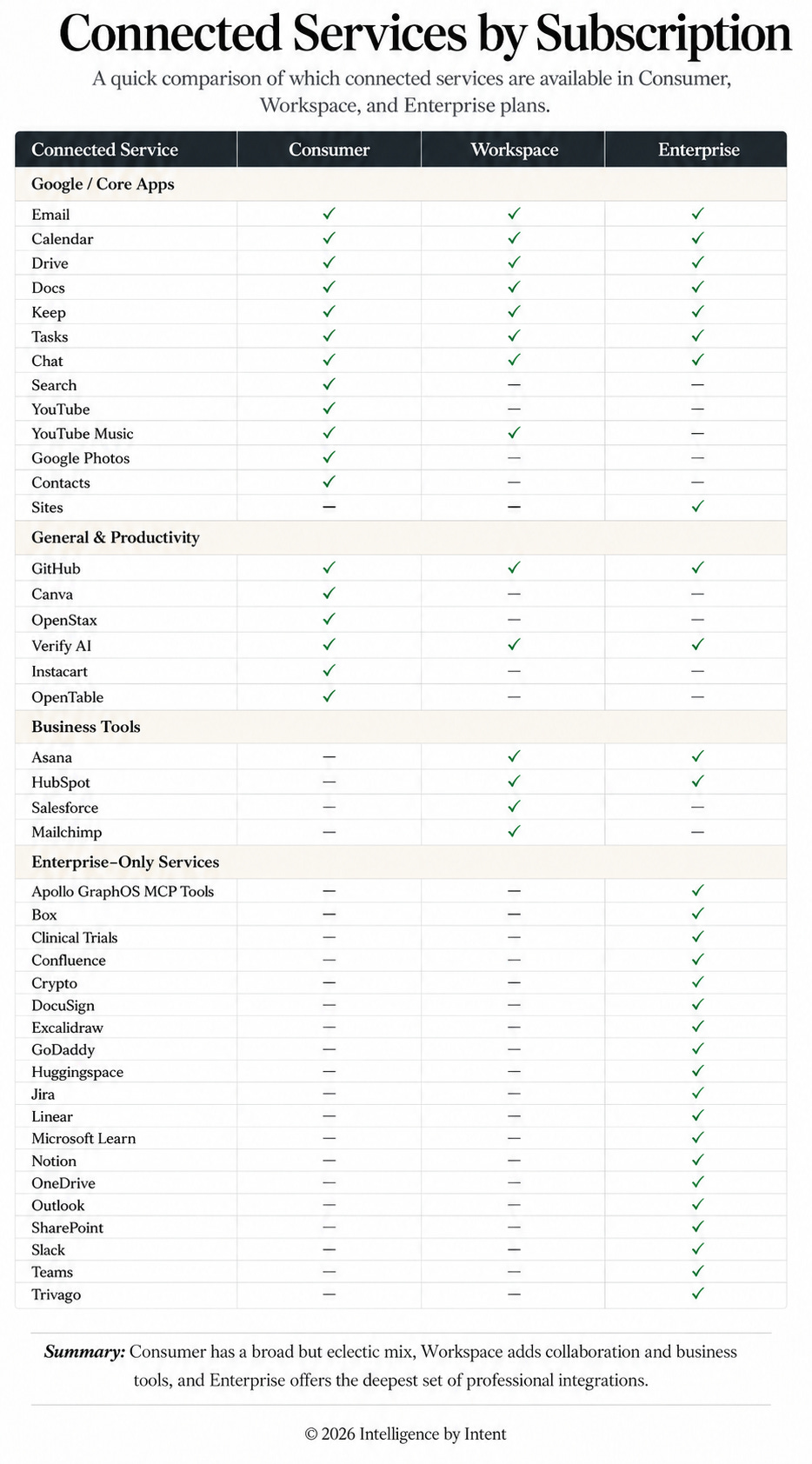
At the consumer level you get the Workspace apps, plus Search, YouTube, YouTube Music, Google Photos, GitHub, OpenStax, Canva, Contacts, Instacart, OpenTable, and Verify AI. A genuinely random mix.
Workspace gives you the Google apps plus Chat, then YouTube Music but not YouTube, GitHub, Asana, HubSpot, Salesforce, Verify AI, and Mailchimp.
Enterprise is a different list entirely: Apollo GraphOS, Asana, Box, the Google apps, Clinical Trials, Confluence, Crypto, DocuSign, Excalidraw, GitHub, GoDaddy, Hugging Face, Jira, Linear, Microsoft Learn, Notion, OneDrive, Outlook, SharePoint, Sites, Slack, Teams, and Trivago.
Look closely and the seams show. Take Salesforce. On Workspace it’s there, but it’s barely there. The connector does one thing: it finds a Salesforce contact from an email address. That’s it. “Find my Salesforce contact named John.” For a CRM that runs the revenue operations of most firms I work with, a single contact lookup isn’t a connector, it’s a toy.
Now go to the Enterprise app, the one a firm subscribes to and a user actually works inside. Salesforce isn’t there at all. Not a thin version, not a lookup, nothing you can switch on. Yes, Salesforce can be wired into the Gemini Enterprise platform on the back end, as a data store an admin sets up in Google Cloud. But that’s a different thing from what a person sitting in the app can connect to on their own. The user-facing Enterprise product, the tier built for the biggest, most CRM-dependent companies, gives an end user no way to reach the most important CRM there is. I can’t construct a rationale for that. It reads like three teams shipped three lists and nobody compared notes.
I built an infographic that lays all of this out side by side, because it’s the kind of thing you have to see to believe.
The Antigravity privacy gap most clients never see
This last one is deep in the weeds, and it matters more than anything else on this list.
When you have a ChatGPT Business or Enterprise plan, or a Claude Team or Enterprise plan, and you use a coding agent like Codex or Claude Code, those sessions fall under the commercial terms you signed. Private. Not trained on. That’s the deal, and it’s clean.
Google works differently, and I still don’t fully understand why. Here’s what I found when I was writing a privacy paper and wanted to be precise. If you sign into Antigravity (the app or the CLI), with your workspace account, the consumer terms end up governing your sessions, which means your interactions can be used for training. The cleanest way to get real privacy protection is to pay for a separate developer license, the Code Assist license, or to use the API and pay per token. I’m confident almost none of Google’s customers assume this. I didn’t, and I do this for a living. I only caught it by reading the actual terms line by line.
Sit with that for a second. A firm buys Workspace believing it has bought business-grade privacy. A developer on that firm’s account opens Antigravity to write some code. And depending on how they signed in, that code and those prompts can flow into training, because the protection they thought they paid for doesn’t reach that tool. For a law firm handling privileged material, that’s not a footnote. That’s a problem you have to know about before anyone touches the tool.
What to do Monday morning
If you’re weighing Gemini for your firm, here’s where I’d start.
Map which Gemini tier each team is actually on, then list the exact models and thinking levels they can reach. Don’t assume the business tier is the strongest. Check it.
For anyone who needs the top model with deep reasoning, set up AI Studio with an API key as a stopgap, and treat it as a workaround, not the destination.
Before you let any developer use Antigravity, confirm how they sign in and which terms govern their sessions. If privacy matters, budget for a Code Assist license or API access.
Hold off on standardizing firm-wide until projects and memory reach Workspace. Run a small pilot, keep your client matters organized somewhere with real privacy in the meantime.
The bottom line
Google is building some of the most powerful models in the world. I don’t doubt that, and I’m not rooting against them. But I serve clients who need three things at once: the best models, real control over privacy, and connections to the tools they already run on. Until Google lines those up across the tier that businesses actually buy, I can’t tell a managing partner to standardize on Gemini.
3.5 Pro is almost here. I hope a few of these get fixed on the way out the door. I’d love to change this answer.
Note: I have endeavored to be as accurate as possible in building the connectivity table and statements around privacy. Any errors are fully on me. If someone sees something that is incorrect, please let me know and I will happily address in future updates!
Google's models aren't the problem. The packaging is. Until the best features reach the tier your firm actually pays for, with privacy you can prove and your client matters kept apart, standardizing on Gemini is a decision you make with your eyes open, not on faith. If you're weighing this for your own firm and want a second read before you commit, I'm at steve@intelligencebyintent.com. Save this one for the partner who's about to sign the contract.
the best write up on this topic I've seen! to this day I wasn't able to use 3.5 flash in antigravity (connected via workspace account) and the main reco (from gemini chat) is to use private google one account (with ai pro plan)... which of course is no go for anything work related stuff for me
Thx for sharing - very usefull 🤗