


Image created by Nano Banana 2
What Happens When AI Stops Waiting for You to Ask
TL;DR: I started with OpenClaw, an open-source personal AI agent system. It proved the concept, but it wasn’t ready for real business use. So I rebuilt everything on Claude Code with Anthropic’s Opus 4.6. The result is Project Ollie: 14 specialized AI agents running on a $600 Mac Mini that monitor email, track CRM activity, generate intelligence briefings, and deliver executive summaries to my phone before I wake up. What mattered most wasn’t the demo. It was figuring out what I could actually trust with real work.
Here’s how most professionals use AI right now: open a browser tab, type a question, get an answer, close the tab. Maybe do it again tomorrow.
That’s fine. It’s useful. But it’s also a little absurd. It’s like having a brilliant analyst on staff and only asking them one question a day before sending them home.
I wanted something different. I wanted AI that didn’t sit around waiting for me to show up. Something that would scan my email at 3 AM, cross-reference my calendar, flag the prospect I forgot to follow up with, and have a briefing ready on my phone by the time I poured my first sparkling water. Yes, sparkling water. I’m that guy.
So I built it. Then I broke it. Then I rebuilt it.
The OpenClaw Starting Point
If you follow the AI agent space at all, you’ve probably seen OpenClaw. It’s one of the clearest proof points yet that personal multi-agent AI systems are real, and they’re here now.
I started there. I built my first version on it and learned a ton.
But when clients asked me whether I’d recommend it for a real business environment, my answer was no. Not right now.
That isn’t a knock on the project. OpenClaw is genuinely impressive. It helped show a lot of people that personal agent systems are no longer science fiction.
What it didn’t give me was something I felt comfortable trusting with my actual business. The security model is whatever you configure. Community modules may or may not be vetted. And the distance between “cool demo” and “I trust this with client communications” is a lot bigger than most people think.
That gap turned out to be the whole story.
Why I Rebuilt Everything
So I moved the system to Claude Code and rebuilt it around Opus 4.6 through my Teams subscription.
That was a real tradeoff. I gave up model flexibility. OpenClaw lets you mix and match models however you want. In exchange, I got a much deeper and more coherent system: MCP, native tool use, subagents, and more reliable structured output. One opinionated environment instead of a patchwork.
That mattered more than I expected.
OpenClaw gives you building blocks and says, go assemble something. That’s exciting. But I didn’t need maximum flexibility. I needed something that could do specific jobs for a specific business, every day, without drama.
That became Project Ollie.
What Project Ollie Actually Does
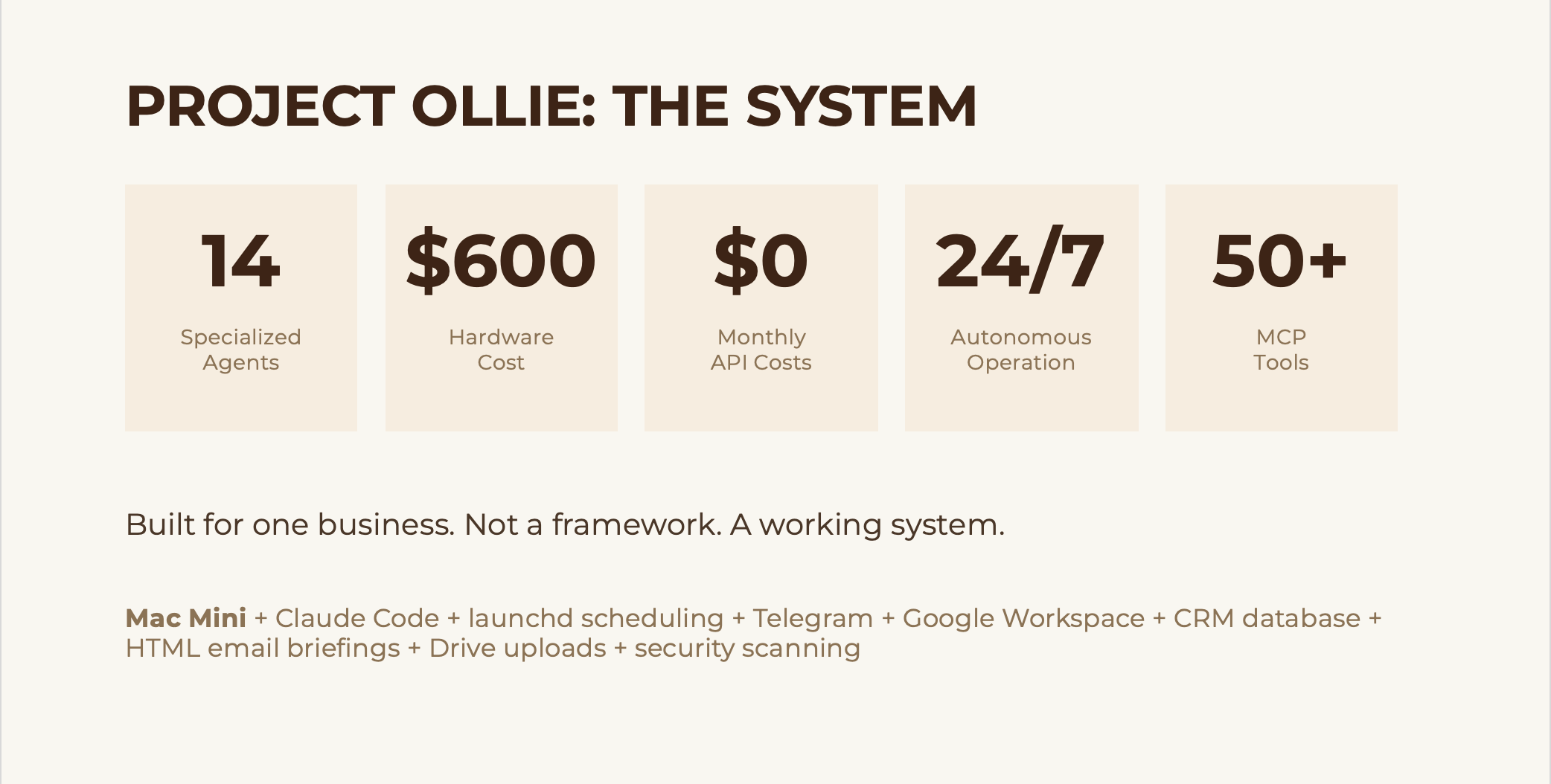
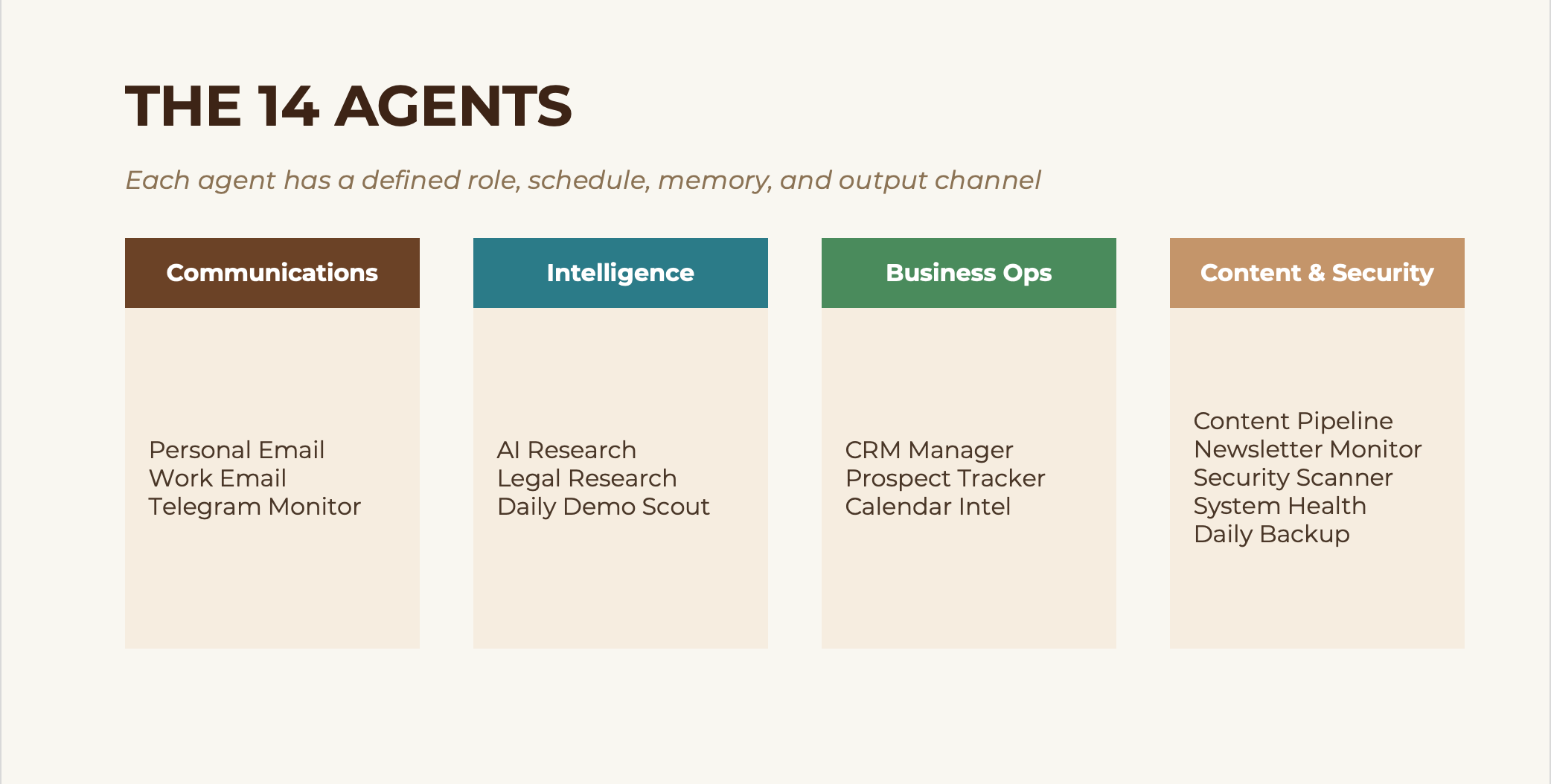
Ollie runs on a Mac Mini that cost me about $600 at Costco. It runs 24/7. It has 14 specialized agents, each with a defined role, its own schedule, persistent memory, and designated output channels.
A quick note on cost, because people always ask. I haven’t received a separate API bill beyond my Claude Teams seat so far. That is not the same thing as unlimited free usage. Team plans have limits, and heavier workloads could change the math. For my current volume, it has been covered. I would not assume that is universally true.
The agents fall into four groups. Communications agents handle personal email, work email, and Telegram monitoring. Intelligence agents run AI research, legal research, and a daily demo scout. Business ops agents manage CRM activity, track prospects, and pull calendar intelligence. Then there’s a content and security layer covering the content pipeline, newsletter monitoring, security scanning, system health, and daily backups.
Every morning before 7 AM, I get color-coded briefings delivered to Telegram and email. Each one follows the same structure: Top of Mind, Calendar, Communications, and FYI.
I didn’t design that structure because it looked nice on paper. I designed it because the first round of unstructured briefings taught me something important: if the output isn’t structured well, you stop reading it. Fast.
What Actually Happened After It Was Running
This is the part most people leave out, and it’s the part that matters most.
I killed 3 agents.
The demo scout was generating more noise than signal. Two content pipeline agents were producing summaries I never read. Gone. No regrets. Fewer agents doing real work is better than more agents producing clutter.
One agent caught a client follow-up I would have missed completely. A thread had gone cold for 4 days, buried under newsletters and scheduling noise. Ollie flagged it. I replied that morning. It turned into a booked engagement. That single catch justified a big chunk of the project.
The biggest win was not drafting. It was not research. It was morning prioritization. Knowing what actually needs my attention at 6:45 AM, before I open my inbox and let everyone else’s priorities hijack my day, changed the value of the whole system. That shift sounds small until you feel it for a few weeks in a row. Then you realize it compounds.
The biggest risk was not hallucinations. It was permissions. At one point, an agent executed a command it should not have. Nobody got hurt, but it was enough to make me rethink the entire access model. That moment did more to shape the architecture than any successful run ever did.
And the honest truth is that about half of what I built in the first version had to be removed, tightened, or rebuilt. The version that survived is leaner, less flashy, and much more useful.
That’s usually how this goes.
How an Agent Actually Runs
The architecture is almost boringly simple.
macOS has a built-in scheduler called launchd. It reads a configuration that says, at 3 AM, run this script. The script is a universal launcher called run-agent.sh. It receives the agent name as an argument, loads the agent definition and prompt template, pulls in the agent’s memory from prior runs, assembles the prompt, and launches a headless Claude session.
Claude does the work: fetches emails through the Gmail API, parses and filters them, checks for unanswered threads, connects dots across email and calendar, builds the briefing, saves the output, and updates memory. The shell script handles delivery to Telegram, Google Drive, and email.
One launcher handles all 14 agents. The only thing that changes is the agent name passed in.
I spent far too long getting that part clean, and I’m still unreasonably proud of it.
The Security Decisions That Actually Matter
This is where it stops being a fun build and starts becoming a real operational question.
Anyone can build a demo. The real question is whether you would trust it with your calendar, your CRM, or your client communications.
At first, I wouldn’t have. Honestly, I didn’t.
I built a dual-layer email scanning system: visual analysis plus text injection detection on inbound email. Ollie has read-only access on my personal accounts. It can only send from its own dedicated account. Agents do not write directly to my calendars. API keys live in a restricted secrets file. FileVault is on. The firewall is on.
And yes, I’ve had incidents. That command execution problem happened because I gave an agent more access than it needed before I had really tested the boundaries. Nothing catastrophic, but it was exactly the kind of moment that makes you rethink your defaults.
My rule now is simple: start restrictive, loosen carefully. Write access is earned, not assumed.
Guardrails are not optional. They are architecture.
That matters even more when you start connecting outside tools and services. Vendors can give you powerful plumbing, but they are not carrying your risk for you. Security is still your job.
What This Means for You
You are probably not going to go home tonight and build 14 agents. That is not the point.
The point is that the barrier to entry for autonomous AI systems is far lower than most people think. This is not a $60,000 enterprise software story. It is a small-machine-plus-subscription story, which is exactly why it matters.
And what surprised me most is that proactive AI feels fundamentally different from reactive AI. Once the system starts doing useful work while you are sleeping, you stop thinking about AI as a chatbot and start thinking about it as operating leverage.
That changes what falls through the cracks. It changes how you start your morning. And over time, it changes how much follow-through you can carry without hiring more people.
That does not mean every agent is magic. Most are not. It means a well-designed system can create an advantage that compounds.
If you want to experiment with this, do not start with 14 agents. Start with one question: What do I do every single day that an AI could do at 3 AM instead?
Email triage. Calendar prep. CRM follow-up reminders. Pick one. Build trust there first. Tighten the guardrails when something goes sideways, because something will go sideways. Then expand.
The Real Gap
OpenClaw helped show what was possible. Project Ollie is what happened when I tried to close the gap between possible and trusted.
That gap is where the hardest part is. It is also where the value is.
The tools to cross it are sitting on a $600 Mac Mini on my desk right now, doing their jobs while I write this.
If you read this far, you are not casually curious about AI agents. You are sitting with a harder question: what is the distance between what is possible right now and what I would actually trust inside my own operation?
That is the conversation I have every day with managing partners, COOs, and practice group leaders who are past the hype and into the “now what” phase. If you are working through where agents fit, where the guardrails go, or whether any of this is ready for your environment, send me a note at steve@intelligencebyintent.com. Tell me what you are building or where you are stuck. I will give you a straight answer about what is ready, what is fragile, and where the real constraints are.