


Image created by Nano Banana 2
The AI Privacy Policies Your Firm Actually Needs to Understand
TL;DR: Every major AI platform draws one hard legal line: consumer terms vs. commercial terms. Consumer side? Your data trains their models by default. Commercial side? It doesn’t. But that line is stranger and more consequential than most firm leaders realize, and it has nothing to do with how much you’re paying. This is the full breakdown for ChatGPT, Claude, Gemini, Grok, and Perplexity, every tier, including the new CLI tools and agentic agents that most firms haven’t even thought about yet.
Personal note: This is a complex topic, and I have endeavored to provide the most accurate information available across all of these tools and subscriptions. If I made a mistake, please let me know, and I will work to correct it!
I keep having the same conversation.
A managing partner pulls me aside after a training session and says something like, “So, Steve, I’ve been using ChatGPT for about six months now. My IT people keep telling me we need an enterprise plan. But honestly, I’m not sure what changes. Is my $20/month plan actually a problem?”
And I can see it on their face. They’ve heard the talking points. “They train on your data.” “Enterprise is secure.” They’ve nodded through a vendor slide deck that said “SOC 2 Type II” and didn’t raise their hand to ask what that actually meant for the client memo they drafted yesterday afternoon.
So I’m going to try to answer that question properly. All of it.
I spent the past week pulling apart the privacy policies, terms of service, help center articles, and compliance documentation for every major AI platform. Five vendors. Thirty-plus subscription tiers. Every CLI tool. Even Cowork (we’ll get to that). I used ChatGPT’s deep research and Gemini’s deep research to cross-reference each other’s findings against the actual vendor pages. Then I read the vendor pages myself, because when you’re publishing something that firm leaders will use to make security decisions, you don’t just trust the summary.
Here’s what I came away with.
It’s Not About How Much You Pay
This is the part that surprises people the most, and it’s the single most important thing in this entire article.
Every AI vendor splits its world into two legal buckets: consumer terms and commercial terms. Not “cheap and expensive.” Not “basic and premium.” Consumer and commercial.
Under consumer terms, the vendor is what privacy law calls a “data controller.” They can use your inputs, your file uploads, and even their own outputs to train future models. They usually give you a toggle to opt out. But the default, in almost every case, is that training is on.
Under commercial terms, the vendor is a “data processor.” They commit by contract to not training on your data. You get admin controls, audit logs, governance. And the ability to sign a BAA if you need HIPAA coverage.
Now here’s the part that catches people. A ChatGPT Pro subscription costs $200 a month. That’s the most expensive individual plan OpenAI sells. It’s still a consumer account. Same terms of service as the free tier. A Claude Max plan is $200/month. Also consumer. Google AI Ultra is $250/month. Also consumer.
You could be a senior partner at a major law firm, paying top dollar for the most powerful AI models available, drafting client strategy documents and redlining contracts and brainstorming case theory. And unless you went into your settings and turned off a toggle you might not know exists, all of that is eligible to train the next version of the model.
I’ll say it plainly: the price of the subscription does not determine the privacy protections. The type of agreement does. And most professionals I talk to are on the wrong side of that line.
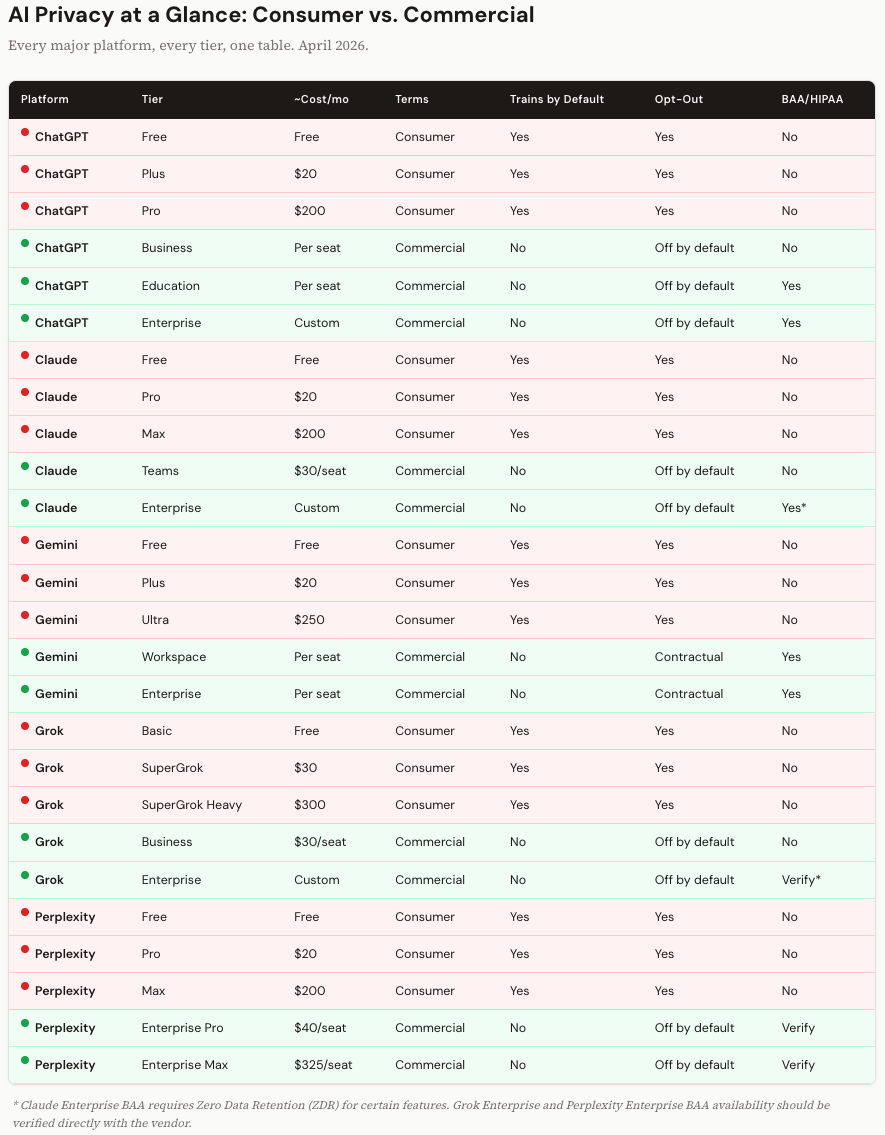
The Platform-by-Platform Breakdown
I want to walk through each platform, but I’m going to focus on the things that surprised me and the details that matter for your decision-making. I’m not going to give you five versions of the same paragraph. (The tables will handle the consistent side-by-side comparison.)
ChatGPT: $200/Month Still Won’t Protect You
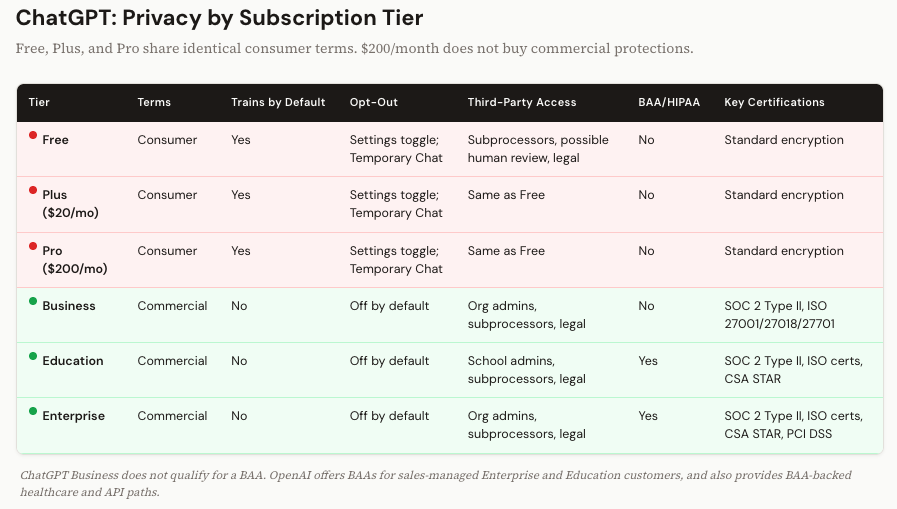
OpenAI makes this both simple and maddening. Free, Plus, and Pro all operate under identical consumer terms. The only thing that changes as you move up is compute: more model access, faster responses, priority routing. The privacy policy is the same doc, word for word.
On the commercial side, Business, Education, and Enterprise plans are governed by OpenAI’s Services Agreement. No training by default. Admin controls. Audit logs for Enterprise.
But here’s a detail that gets missed: ChatGPT Business does not qualify for a BAA. OpenAI offers BAAs for sales-managed Enterprise and Education customers, and also provides BAA-backed healthcare and API paths. So if you’re a mid-sized firm that went with Business because it was cheaper than Enterprise, and you handle anything that touches health information, you have a gap. I’ve seen this exact scenario at three firms in the last six months.
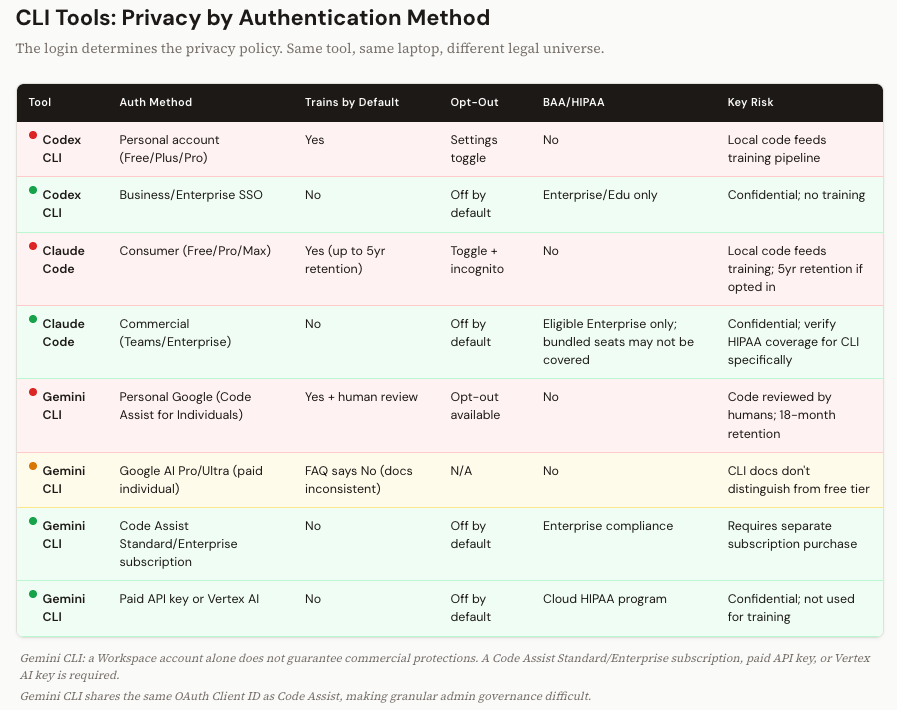
Codex, OpenAI’s CLI coding tool, is available on both consumer and commercial plans. In practice, the governing privacy terms track the account you use to authenticate. Developer logs in with their personal Plus account? Consumer terms. Their code, their error logs, their local files, all potentially feeding the training pipeline. Same tool, same laptop, logged in through the firm’s Enterprise SSO? Commercial protections. The tool doesn’t change. The login does. Remember that.
Claude: Five-Year Retention and the Solo Practitioner Problem
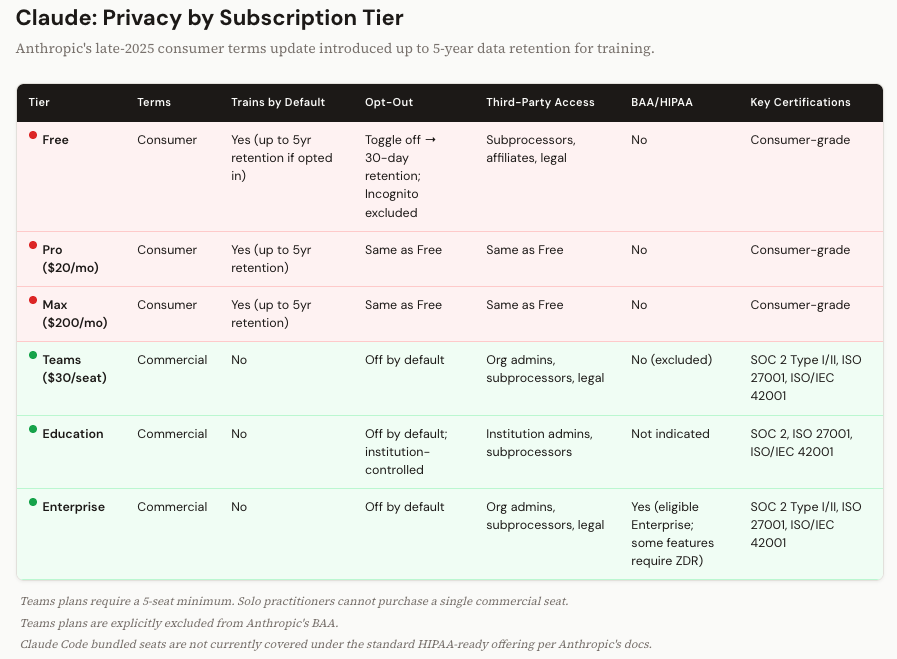
Anthropic updated its consumer terms in late 2025, and this one genuinely caught me off guard.
If you’re on a Free, Pro, or Max plan and you have the “Help improve Claude” setting enabled (or you didn’t opt out when prompted), Anthropic retains your conversations for up to five years. For training purposes.
Five years. I checked the source docs twice.
Turn that setting off and retention drops to 30 days. Incognito conversations are excluded from training regardless. So there are controls. But the default retention window is dramatically longer than I expected, and longer than what any of the other platforms advertise.
On the commercial side, Teams and Enterprise plans don’t train on your data. Anthropic offers BAAs only for eligible Enterprise customers, and current documentation indicates that Claude Code bundled seats are not covered under the standard HIPAA-ready offering. For certain API configurations, HIPAA compliance may require enabling Zero Data Retention. ZDR means your prompts and outputs are processed in memory and never written to disk. It’s the safest possible architecture. But it also means no conversation history and no persistent context. There’s a real usability tradeoff.
Teams plans are excluded from the BAA entirely. That matters.
And then there’s a structural problem I keep running into with clients. Anthropic requires a five-seat minimum for Teams. If you’re a solo practitioner, a two-person consulting shop, or a small firm with three attorneys, you can’t buy one commercial seat. You either pay for the consumer-grade Max plan (which means consumer terms, no matter what you’re paying) or you buy five seats and leave two empty.
I had a healthcare consultant tell me last month that she pays for three empty seats just to get commercial terms for herself and her partner. She’s not happy about it. I don’t blame her.
Gemini: The Most Complicated Privacy Story in AI
I’ll be honest, Google’s privacy architecture took me the longest to untangle. It’s not that the protections are weak. In many cases they’re the strongest of the bunch. It’s that the system for determining which protections apply to you is genuinely confusing.
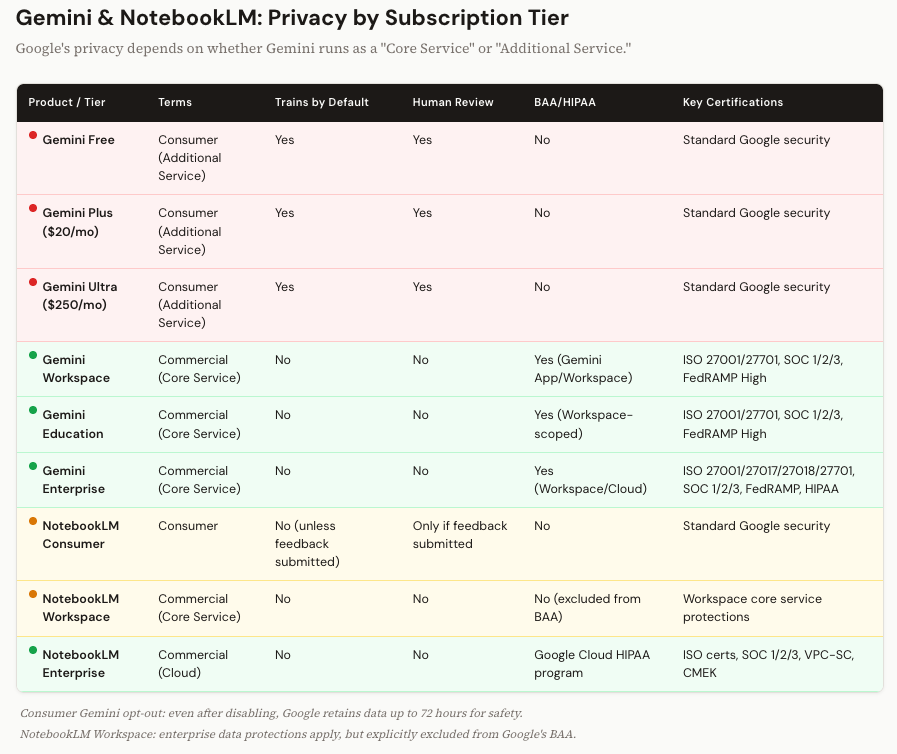
Everything hinges on a distinction called “Core Service” vs. “Additional Service.” If you use Gemini through a personal Google account, even a paid Google AI Plus or Ultra account, it’s classified as an Additional Service. Consumer terms. Human reviewers may read your conversations. Your data feeds model improvement. And even after you toggle off the opt-out setting, Google holds the right to retain data for up to 72 hours for safety and reliability.
Human reviewers. I want to make sure that registered. Not just algorithms. People at Google may read what you typed. On the consumer tier, that’s part of the deal.
When Gemini is deployed as a Core Service inside a qualifying Workspace account, it’s a different world. No training. No human review. Full protections under the Cloud Data Processing Addendum. BAA available for covered services. This is genuinely enterprise-grade.
Now, NotebookLM. I know a lot of firms use it. Google elevated NotebookLM to Core Service status in early 2025. That was a big move. It means Workspace users get enterprise data protections: no model training, no human review. Good.
But Google explicitly excludes NotebookLM from the BAA. So if you’re a healthcare organization that moved your research workflows into NotebookLM because it became a Core Service, you’ve got data protections but you don’t have HIPAA coverage. Those are two different things. And in a regulated industry, the distinction is the one that matters. There is an enterprise version of NotebookLM that you can subscribe to that does have BAA/HIPAA (but it’s an additional subscription).
The Gemini CLI is where Google’s privacy story gets genuinely tricky, and it’s different from how ChatGPT and Claude handle their CLI tools.
When you authenticate the Gemini CLI with a personal Google account, you’re routed through something called “Gemini Code Assist for individuals.” Under that umbrella, your prompts, code, and outputs are collected and may be used for model training. Human reviewers may read your data. That’s the default for anyone logging in with a personal Gmail account on the free tier.
But here’s where it diverges from the other platforms: just having a Google Workspace account doesn’t automatically give you commercial protections on the CLI. In fact, the free Code Assist for individuals tier isn’t even available to Workspace accounts. To get no-training protections on the Gemini CLI, you need one of three things: a separate Gemini Code Assist Standard or Enterprise subscription (purchased through Google Cloud, with per-user licensing), a paid Gemini API key through the Developer API, or a Vertex AI API key. Without one of those, a Workspace user may not be able to use the CLI at all, or may end up on terms that aren’t what they expected (it actually defaults to the consumer terms when using a Workspace login unless you have one of the three things I mentioned).
Google’s FAQ does state that paid Google AI Pro and Ultra subscribers get no-training protections. But a GitHub issue filed in early 2026 flagged that the CLI’s own documentation doesn’t distinguish between free and paid individual users, grouping them all under the same “Code Assist for individuals” privacy notice. That inconsistency hasn’t been fully resolved in the docs I reviewed. It appears that the data IS trained on under pro and ultra subscriptions with the CLI.
There’s also a governance wrinkle for admins. The Gemini CLI shares the same OAuth Client ID as the broader Code Assist suite, which makes it harder for Workspace administrators to apply separate policies specifically to the CLI. If an enterprise OAuth token expires silently, a developer could fall back into a consumer-grade privacy session without realizing it.
Bottom line on Gemini CLI: it’s the most complicated privacy story of any CLI tool in this article. If your firm uses it, don’t assume that a Workspace login means you’re protected. Verify the specific subscription and authentication method for every developer on your team.
Grok and Perplexity: The Newer Players
I’ll cover these two together because the pattern is consistent with what we’ve seen, and the differences worth noting are specific.
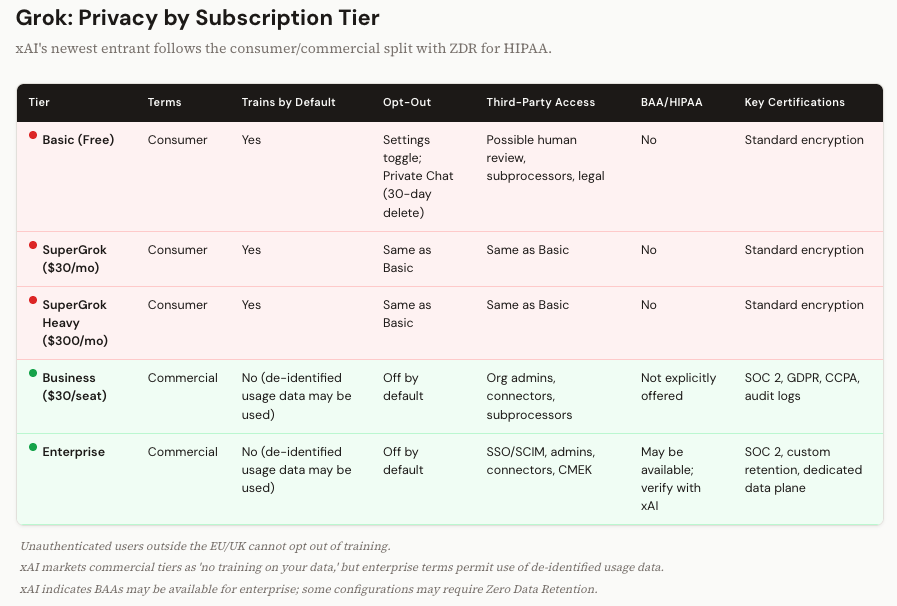
Grok (xAI) follows the standard split. Basic, SuperGrok ($30/month), and SuperGrok Heavy ($300/month) are all consumer terms. Training on by default. Opt-out via settings or “Private Chat.” One detail that stands out: if you access Grok.com without logging in, and you’re outside the EU and UK, you can’t opt out at all. Your interactions are collected anonymously. The commercial tiers (Business and Enterprise) market themselves as “no training on your data,” though the enterprise terms do allow use of de-identified usage data for product improvement. xAI indicates BAAs may be available for enterprise customers; some configurations may require Zero Data Retention.
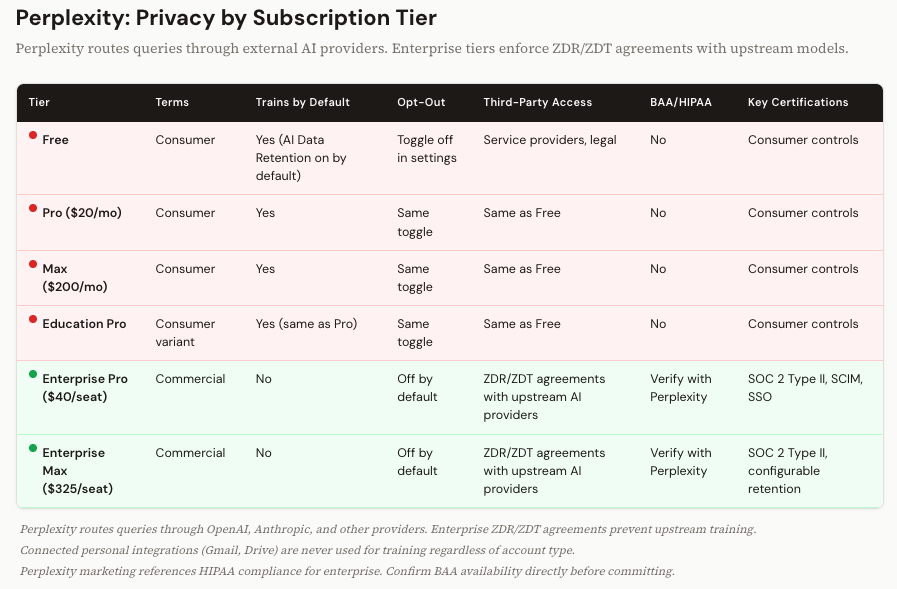
Perplexity is interesting because of its architecture. It’s a search engine that routes your queries through external AI models, including models from OpenAI and Anthropic. So your data doesn’t just live with Perplexity. It flows through their upstream providers. On the consumer side (Free, Pro, Max, and Education Pro), AI Data Retention is on by default. On the enterprise side (Enterprise Pro at $40/seat, Enterprise Max at $325/seat), Perplexity has Zero Data Retention and Zero Data Training agreements with those upstream providers. That’s a contractual firewall that prevents OpenAI or Anthropic from training on your enterprise Perplexity queries. It’s a smart piece of legal architecture.
Perplexity Enterprise publicly advertises SOC 2 Type II, SSO, SCIM, audit logs, and configurable retention and privacy controls. Perplexity’s marketing materials reference HIPAA compliance for enterprise tiers, though I was unable to verify a primary source explicitly confirming a publicly available BAA in this review. If HIPAA matters to your use case, confirm BAA availability directly with Perplexity before committing.
The Agentic Tools Are Where This Gets Scary
Everything above is about what happens when you type into a chat window. But there’s a new category of AI tool that changes the risk calculus entirely, and most firms haven’t caught up to it yet.
I’m talking about CLI tools and desktop agents. Claude Code. OpenAI’s Codex. Google’s Gemini CLI. And Anthropic’s Cowork.
These tools don’t sit inside a browser. They run on your machine. They read your local files. They traverse your codebase. They see your terminal output. And in the case of Cowork, when it’s using its computer use mode to interact with your desktop applications, it takes screenshots of your screen to navigate what’s in front of it.
I want to sit with that for a second, because the implications are different from anything we’ve discussed so far.
When a developer types a question into ChatGPT’s browser interface, they’re choosing what to share. They copy-paste a code snippet, or they describe a problem in their own words. There’s a human filter. With a CLI tool, there’s no filter. The tool reads your project directory. It sees your environment variables, your config files, your error logs. It has access to whatever your file system has access to.
And the privacy protections? For Claude Code and Codex, they’re determined entirely by the login. Personal account? Consumer terms. Everything the tool reads from your local machine could feed the training pipeline. Enterprise account? Commercial terms. Protected.
Same tool. Same laptop. Same codebase. Different login, different legal universe.
Google’s Gemini CLI is more complicated. As I covered in the Gemini section above, a Workspace login alone doesn’t guarantee commercial protections. You need a specific Code Assist subscription or API key. That makes it the hardest CLI to govern of the three.
Cowork: The Governance Blind Spot
Cowork is different from the CLI tools above, and it needs its own discussion.
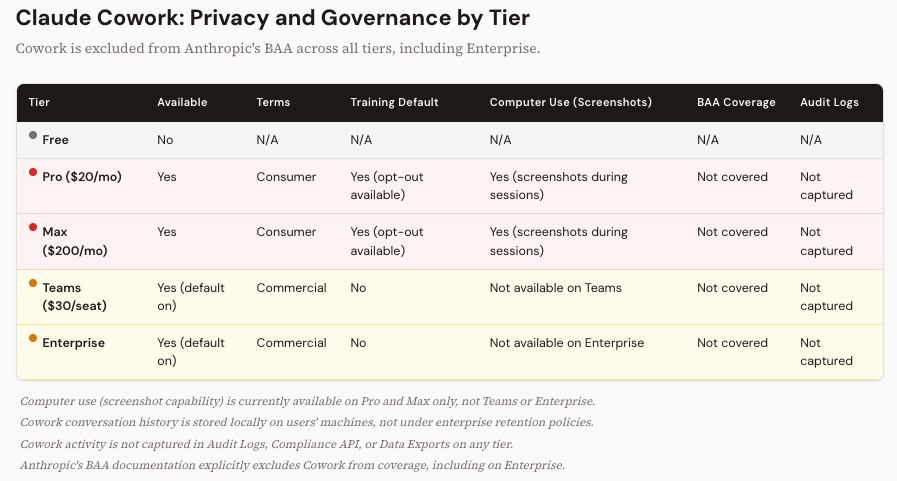
Anthropic’s Cowork is a desktop agent, currently in research preview, available on Pro, Max, Teams, and Enterprise plans. It requires the Claude desktop app on macOS or Windows. You switch into Cowork mode when you want Claude to go beyond chat and actually do things: work with local files, run commands, browse the web. Most of that work happens inside an isolated VM on your machine. Claude operates in a sandbox, handles your tasks, and doesn’t interact with your broader desktop environment.
But Cowork also has a feature called “computer use.” This is where things get interesting for privacy purposes. When you activate computer use, Claude steps out of the sandbox and interacts with your actual desktop applications. To do that, it takes screenshots of your screen so it can see what’s on it, navigate menus, click buttons, and move between apps. Anything visible on your screen during a computer use session, including whatever documents, spreadsheets, or emails happen to be open, is visible to Claude.
Right now, computer use is only available on Pro and Max. Those are consumer-tier plans. Teams and Enterprise users can use Cowork for its VM-based capabilities, but they don’t have access to the computer use feature that captures screenshots. That means the screenshot risk currently sits entirely on the consumer side, where privacy protections are weakest. If you’re on a Pro or Max plan and you activate computer use with a client document visible on screen, that content is fair game under consumer terms unless you’ve opted out of training.
When computer use eventually rolls out to Teams and Enterprise (and it will), the training concern goes away because commercial terms prohibit it. But the visibility concern doesn’t. Even on commercial plans, Anthropic’s service providers and subprocessors can process your content. And Anthropic’s own documentation has a discrepancy on screenshot retention: the API docs say computer use data isn’t retained after the response is returned, while the commercial privacy docs reference a 30-day deletion window. Until that’s clarified, I wouldn’t make assumptions about how long those screenshots persist on Anthropic’s backend.
That said, screenshots aren’t the biggest Cowork risk for most firms. The governance gaps are.
Cowork is on by default for Teams and Enterprise. Admins have to proactively disable it. Nobody has to opt in.
Cowork activity doesn’t appear in Audit Logs, the Compliance API, or Data Exports. If someone on your team is using Cowork to process client materials, your security and compliance teams have no way to know.
Conversation history from Cowork is stored locally on users’ machines, not on Anthropic’s servers under your enterprise retention policy. That’s data sitting on individual laptops, outside your centralized governance.
And Cowork is explicitly excluded from Anthropic’s BAA. All tiers. Including Enterprise. If your firm has a BAA with Anthropic covering Claude and Claude Code, Cowork is not part of that agreement.
Anthropic is direct about this in their documentation: Cowork should not be used for regulated workloads. I’d extend that guidance further. For any firm handling confidential client information, Cowork in its current state should be carefully evaluated for your specific use cases until the audit logging, compliance integration, and BAA coverage catch up to the product. The technology is impressive. The compliance story isn’t there yet.
The Traps and Tradeoffs
A few things that complicate this picture, because I’d rather be honest with you than tidy.
“No training on your data” is the biggest win when you move to commercial terms. But it’s not the same as “nobody can see your data.” Even on commercial plans, subprocessors and service providers can access your content. In some cases, human reviewers can look at conversations for safety or abuse prevention. And of course, legal compulsion (a subpoena, a court order) applies everywhere. “No training” is the right starting point. Just don’t confuse it with “total privacy.”
BAA availability is more patchwork than you’d think. ChatGPT Business doesn’t offer one. Claude Teams doesn’t offer one. NotebookLM doesn’t offer one, even as a Workspace Core Service. Cowork is explicitly excluded, even on Enterprise. If HIPAA matters to your practice, you need to verify coverage at the specific product and feature level. Not just the plan name.
Zero Data Retention is becoming the standard for the most sensitive workloads. Anthropic requires it for certain HIPAA configurations, and xAI ties its BAA availability to ZDR for enterprise API use. It’s the strongest possible architecture, because your data is never written to disk. But it means no conversation history, no memory, and a fundamentally different user experience. It’s a real tradeoff, not just a checkbox.
And pricing creates compliance traps. Anthropic’s five-seat minimum. Google’s Workspace NotebookLM BAA gap. The fact that $200/month still leaves you on consumer terms at every platform. These aren’t bugs. They’re product decisions. But they create genuine pain for professionals who need commercial protections and don’t fit the enterprise purchasing model.
What to Do Monday Morning
Audit every AI account in your organization. Not just “who’s using AI,” but what account type they’re logged into. A personal login on a firm device is the single biggest privacy risk most firms have right now, and most don’t know about it.
Mandate enterprise SSO for all CLI and agentic tools. Claude Code, Codex, Gemini CLI. If it runs on a firm machine, it authenticates through the firm’s identity provider. No exceptions. Put it in writing.
Check your BAA coverage at the product level. Pull out your vendor agreement and check what’s actually covered. Cowork is excluded, even on Enterprise. NotebookLM is excluded. Beta features almost never qualify. The plan name is not the coverage boundary.
Disable training on every consumer account you can’t eliminate. People at your firm will use personal AI accounts. That’s reality. At minimum, require them to turn off the model improvement setting. It’s not commercial-grade protection, but it closes the widest gap.
Put this on a quarterly review cycle. Anthropic’s five-year retention policy is new. Google’s NotebookLM reclassification is recent. Grok’s business tier barely exists yet. What’s accurate today will change. Schedule the check.
The Real Point
I’m not trying to scare you away from these tools. I use them every day. I train firms on how to use them well. The AI platforms have built genuinely strong commercial protections, and the no-training commitments at the enterprise level are real, contractual, and audited.
But those protections don’t show up automatically. They require the right subscription, the right authentication, the right configuration, and someone at your organization who bothered to check.
If you read this far, that someone is probably you.
If you read all the way through a nearly 4,000-word article about privacy policies and subscription tiers, you’re not doing it out of curiosity. You’re doing it because you’re the person at your firm who knows this matters, and you haven’t yet found a clear answer you trust enough to act on.
That’s the conversation I have every day with managing partners, CIOs, and COOs who know their people are using these tools and want to get the governance right without shutting everything down. If that’s where you are, send me a note at steve@intelligencebyintent.com. Tell me what you’re working through. I’ll be straight with you about what’s ready, what’s not, and where the gaps are that vendors won’t flag for you.
On "Zero Data Retention [..] means no conversation history, no memory, and a fundamentally different user experience." How is it that near-trillion dollar companies haven't figured this out, and a single developer has? https://confer.to/blog/2026/03/encrypted-memory/