
I can’t believe I missed this announcement. On October 1st, Anthropic released Claude Code Mods. Mods allow you to customize Claude Code. The best analogy I can think of that most people know is browser extensions. Before October 1st, you could only change what Claude Code knew by giving it additional information (context). With Mods, you can now change how Claude Code looks and behaves under the hood. It opens up a world of new possibilities to really tailor your Claude Code experience and make it significantly better. I only discovered this through a YouTube video from Ben AI (link here). I instantly shared this capability with a few friends and knew I needed to write about it as well.
What are mods?
A mod is a small add-on that changes how Claude Code behaves. Think of it as a small, custom-built program (e.g., browser extension) but with a lot more power and flexibility. It might put a new status panel beside your chat so you can monitor in real time how much of your context window has been used. Or it can have it process and change a prompt before Claude goes to work on it. It can also stop a tool call before it runs if it finds it unnecessary to help get you the answer you are looking for.
Let me share a few simple examples here to bring it to life. This one shows progress through the current task.

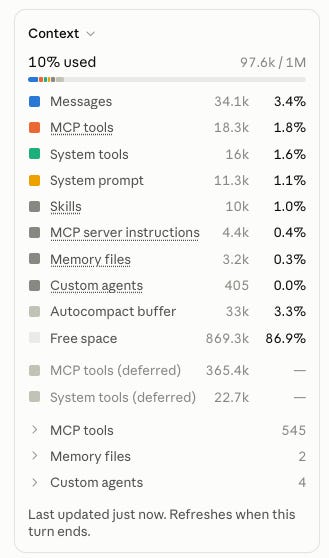
This one tracks how much of the 1M context window is in use and what’s consuming it.
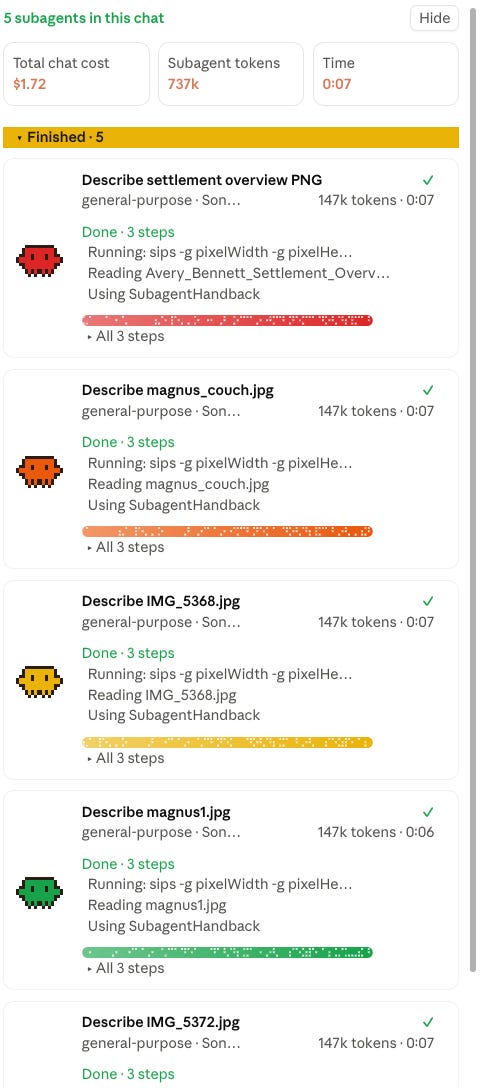
This one is my favorite—it shows what each subagent is doing, how many tokens it’s using, and the cost.
Mods run inside Claude Code, including the Code tab in the Claude desktop app. They aren’t features you’ll find in a regular Claude chat. These images are all from the Claude Desktop app.
They are small programs written in JavaScript or TypeScript. But here’s the interesting part for those of us who aren’t programmers. Anthropic says you can describe what you want to Claude Code and ask it to build the mod for you.
I’ve been looking through a collection that Ben AI posted as part of his YouTube video called the Claude Code Mods Pack. There are nine mods in the pack - I installed all of them. Ben also includes Replay Theater, a sample mod created by Anthropic.
Mods to try first
Helper Desk shows you what Claude is doing. It puts Claude's to-do list above the prompt box, with the items in progress flashing, and opens a side pane with a live card for each subagent. A subagent is a helper Claude spins up to handle one piece of a bigger job. Normally those helpers are invisible to you. With Helper Desk, a glance tells you which pieces are finished and which one is still running.
Handoff deals with the bloated chat. Once a conversation passes 250,000 tokens, or whenever you type /refresh, it writes a summary of the whole chat with a table of where things stand and starts a new chat from it. The new session picks up where the old one stopped without hauling the entire history along. For scale, 250,000 tokens is several hundred pages of text, as a rough estimate.
Screen Share matters to anyone who records demos or trains staff on live work. Type /screen-share and names, emails, phone numbers and money amounts turn into shaded bars on the screen, while Claude keeps working with the actual data underneath. If you've ever stopped a recording to blur a client's name, you'll want this one.
Cache Clock is about money. Claude stores the early part of a long conversation in a short-lived cache so it doesn't have to reprocess everything on every turn, and that cached material costs far less to reuse. When the cache goes cold, the next message pays full freight on the whole history, in dollars if you're on the API or in usage limits if you're on a subscription. Cache Clock puts a countdown above the prompt until that happens, with a Keep Warm button that pings the cache so it stays warm.
The risks are the usual software risks
A mod is code running inside your session. It sees your prompts. Some can rewrite them, and some can block or change what Claude does with your files. That’s what makes them useful, and it’s also the exposure. A sloppy mod can slow everything down or alter a prompt without anyone noticing. A malicious one could send data where it shouldn’t go.
So handle mods the way you’d handle browser extensions. Know who wrote it and check what it can touch. The public mod directories have started listing what each one can access before you install it, which helps. For a firm with confidentiality obligations, whoever owns your AI policy should approve third-party mods before anyone installs them on a machine that touches client files. My most important tip: have Claude Code run a security check on any Mod before you install it. I did that with all of mine (I do it with anything I want to install on my Mac).
What to do on Monday Morning
Find the biggest challenge your team has with Claude Code. That might be losing track of long jobs or repeating the same corrections. Find the Mod that addresses it and have them install it.
Add Mods to your AI use policy. Do not forget this part. Include who can install them and who reviews third-party ones first.
Show your team what Mods can do and tell them to describe the kind of functionality that would be most beneficial to them whether or not the Mod exists today.
For two years we’ve bent our work around the AI tools. Mods let you bend the tool back.
Thank you for reading. If you enjoyed this, please share my newsletter with others.
I was wine tasting this weekend up in Paso Robles. Sadly, Magnus did not join so I don’t have pictures of him meandering through the vineyards so you’ll have to settle for these two photos. It was a spectacular weekend and if you are a regular visitor up there or are looking to go up there, let’s connect and compare notes! My wife and I love it up there (we go 5-6 times/year and belong to several wineries).